
A critical vulnerability appears in your customer portal. Engineering postpones the update because a major release is approaching. A month later, the same weakness is still open—and nobody can produce an approved exception, a temporary safeguard or a retest plan.
For a CEO, DPO or compliance leader, the concern goes beyond a delayed maintenance task. An unresolved flaw can expose personal data and reveal weaknesses in how the organisation makes, escalates and records security decisions. The practical question is whether the business can show that it understood the exposure and acted on it.
An unpatched vulnerability does not automatically trigger a DPDP penalty. The legal issue is whether applicable obligations were breached; a scanner finding alone is not a penalty decision. This guide explains the connection and the evidence leadership should ask for.
Timing matters. As of 17 October 2026, the framework is being introduced in phases. The November 2025 commencement notification places section 8 and section 33 in the eighteen-month stage, corresponding to May 2027. Rules 6 and 7 follow that stage. It would therefore be misleading to describe these core safeguards and penalty provisions as already fully enforced today. [1][2]
In this article
1. How unpatched vulnerabilities connect to DPDP risk
2. What the penalty figures actually mean
3. Why a patch backlog needs business ownership
4. Build a continuous vulnerability management process
5. Prepare for an incident before it happens
6. What leadership should ask before calling the company ready
7. Frequently asked questions
8. Start with a DPDP compliance gap assessment
1. How unpatched vulnerabilities connect to DPDP risk
Section 8(5) requires reasonable safeguards for personal data, including processing performed on a Data Fiduciary’s behalf. Rule 6 specifies measures including access controls, monitoring, data protection, continuity arrangements and appropriate processor contracts. [2][3]
Our practical interpretation is that patch management supports those safeguards: a known exploitable weakness can undermine otherwise well-designed controls. Neither the cited section nor Rule 6 creates a universal deadline of a fixed number of days for every patch. Choose operational targets based on exposure and applicable requirements, and document the reasoning.
Consider a hypothetical customer support platform containing names, contact details and account histories. A security update fixes a weakness in its internet-facing component. The team receives an alert but assumes another vendor owns the update. No one checks that assumption. If the weakness is exploited, the lack of ownership becomes as important to the internal investigation as the software defect itself.
This example is not a reported enforcement case. It illustrates why vulnerability records should connect technical findings to business services, personal data and named decision-makers.
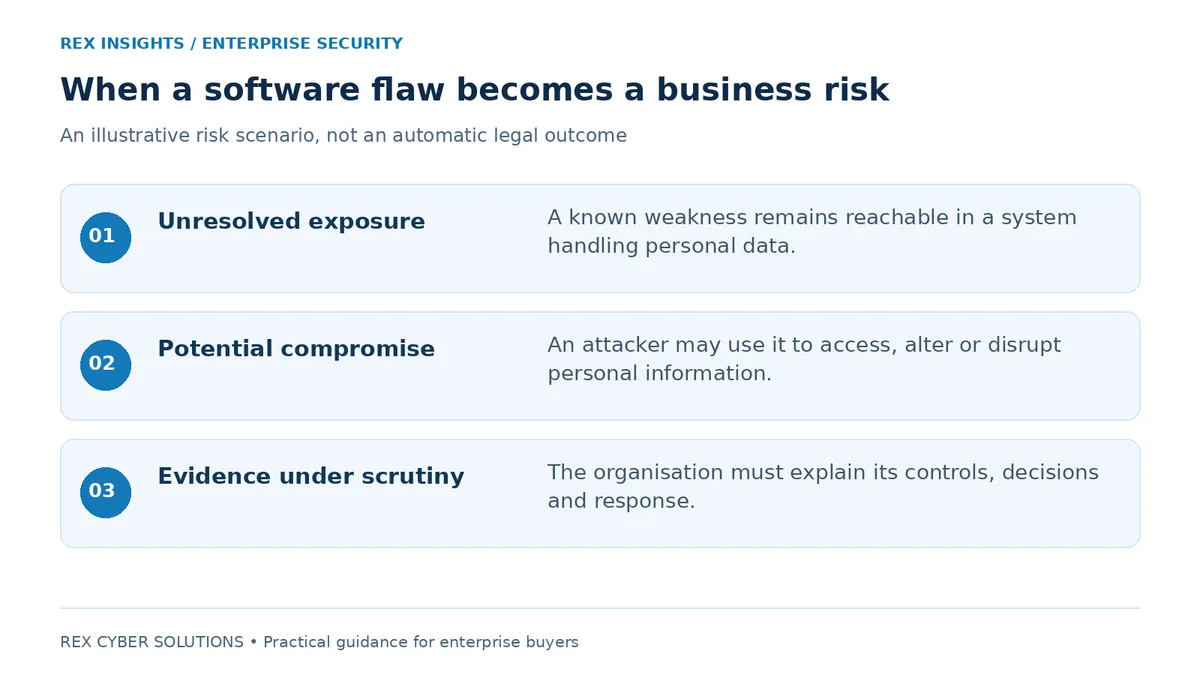
A possible risk pathway. A vulnerability, a personal data breach and a legal violation are distinct concepts.
Need to connect your technical controls with privacy readiness? Explore Rex’s DPDPA compliance services
2. What the penalty figures actually mean
The Act’s Schedule sets the following ceilings. They are not a price list for individual software bugs. [3]
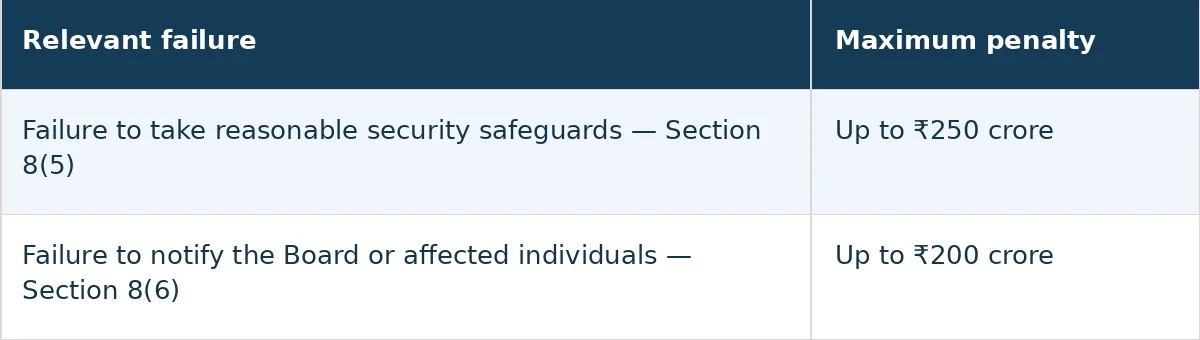
These provisions belong to the phased commencement described above. Under section 33, a penalty follows an inquiry, a finding of a significant breach and an opportunity to be heard. Relevant factors include seriousness, duration, repetition, affected data and the timeliness and effectiveness of mitigation. [1][3]
For budget planning, keep potential regulatory exposure separate from operational costs. Investigation, service restoration, customer communication and engineering work can all consume resources after an incident. Do not treat the maximum statutory amount as either the expected loss or the complete financial impact.
3. Why a patch backlog needs business ownership
The most useful management report is not a long list of vulnerability identifiers. It explains which services remain exposed, which customers or employees could be affected, who owns the work and what prevents closure.
A high patch percentage can hide the wrong exception
A dashboard showing 98% completion can still leave a critical internet-facing system unprotected. Review the remaining exposure rather than relying on the average. Ask whether the outstanding items sit on a customer login service, a remote access gateway or a privileged administration system.
Outsourcing needs a clear handover
For hosted applications, agree who updates the operating system, application dependencies and managed components. Ask suppliers for evidence relevant to your environment, not just a general assurance statement. Record how urgent advisories reach your team and who escalates a missed commitment.
Exceptions must have an expiry date
Some updates require testing or a planned outage. An exception should identify the reason for delay, the affected service, interim protection, an accountable approver and a review date. Repeated extensions deserve a management decision about replacement, isolation or service redesign. A signed exception records the decision; it does not remove the technical exposure.
4. Build a continuous vulnerability management process
The following is a recommended operating approach, not a statutory patching timetable. Adapt it to your infrastructure and risk tolerance.
1. Maintain an asset inventory
Include servers, endpoints, cloud workloads, applications, third-party libraries and externally exposed services. Connect assets to service owners and the personal data they handle.
2. Find and validate weaknesses
Combine vulnerability scanning with configuration reviews and targeted penetration testing. Confirm that findings apply to the deployed version and environment before assigning work.
3. Prioritise the exploitable exposure
Consider active exploitation, internet access, privilege level, affected data and available safeguards. A technical severity score is an input, not the whole business decision.
4. Assign a resolution path
Give each validated finding an owner and target date. Identify whether the right response is a patch, configuration change, access restriction, component replacement or removal.
5. Verify the result
Check the actual system after deployment. A successful change ticket does not prove that every affected instance received the fix. Retest the relevant attack path where appropriate.
6. Review exceptions and recurrence
Track overdue items, recurring weaknesses and assets that are missing from scans. Escalate repeated failures and improve the release or procurement process that caused them.
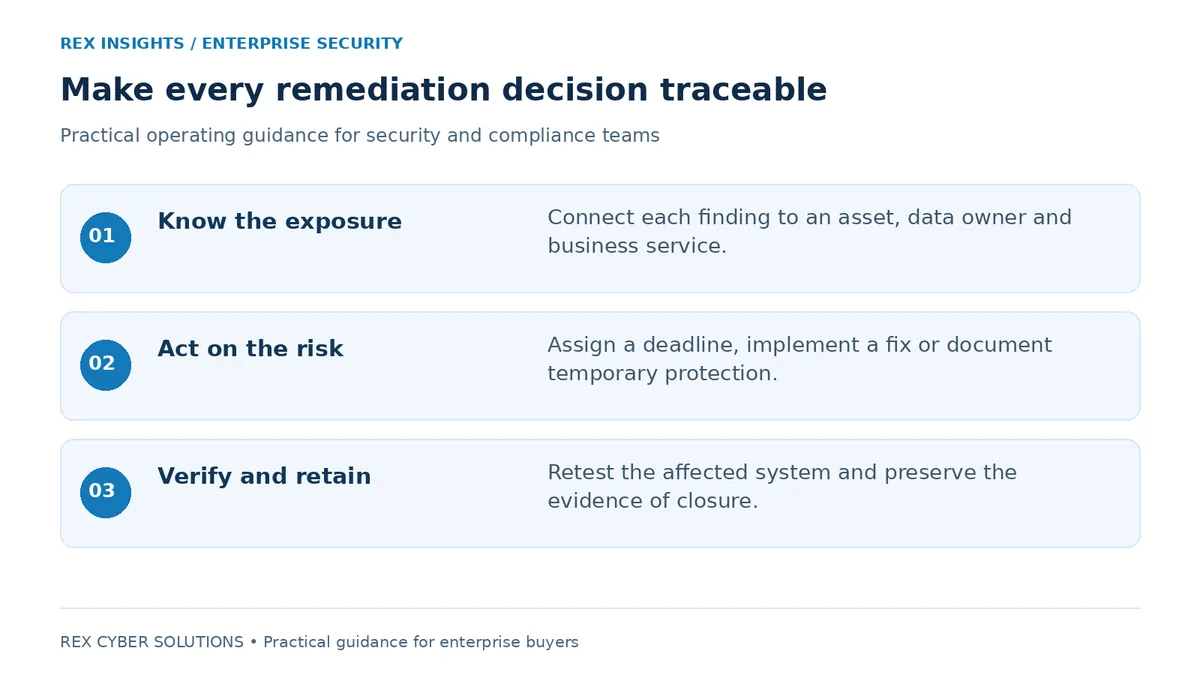
Keep discovery, decisions and closure evidence connected in one record.
Need to validate your infrastructure exposure? Review Rex’s network vulnerability assessment service
For customer portals and business applications, Explore Rex’s web application penetration testing
Continuous tracking does not require running intrusive tests around the clock. It requires a repeatable process that notices change, assigns responsibility and follows each relevant issue through to verified closure. Agree assessment frequency and testing windows around the systems involved.
5. Prepare for an incident before it happens
When the relevant provisions commence, Rule 7 requires notification to affected individuals and initial notification to the Board without delay. Detailed information to the Board follows within 72 hours of awareness, unless the Board permits longer on written request. The 72-hour period is not a general permission to postpone the first notification. [2]
Prepare the operational handover now: who confirms the incident, preserves evidence, identifies affected services and coordinates communications? Keep the vulnerability history, relevant logs, deployment records and supplier correspondence available to the response team. Avoid destroying useful evidence during hurried remediation.
Run a tabletop exercise around an overdue patch on a customer-facing service. Ask engineering to explain containment, compliance to identify the notification decision process and leadership to decide who can approve emergency changes. This rehearsal can reveal gaps that a policy review misses.
6. What leadership should ask before calling the company ready
1. Which systems holding personal data have overdue exploitable vulnerabilities?
2. Who owns each unresolved finding and when will it be reviewed?
3. What temporary protection is operating while the fix is delayed?
4. Which supplier responsibilities remain unclear or unverified?
5. Can we show the deployment and retest evidence for closed issues?
6. Can security and compliance reconstruct the incident timeline together?
Ask for evidence with the answers. A useful record includes the affected asset, discovery date, validation result, risk decision, owner, target date, exception history and final verification. Leadership should be able to follow one issue from detection to closure without asking several teams to rebuild the story.
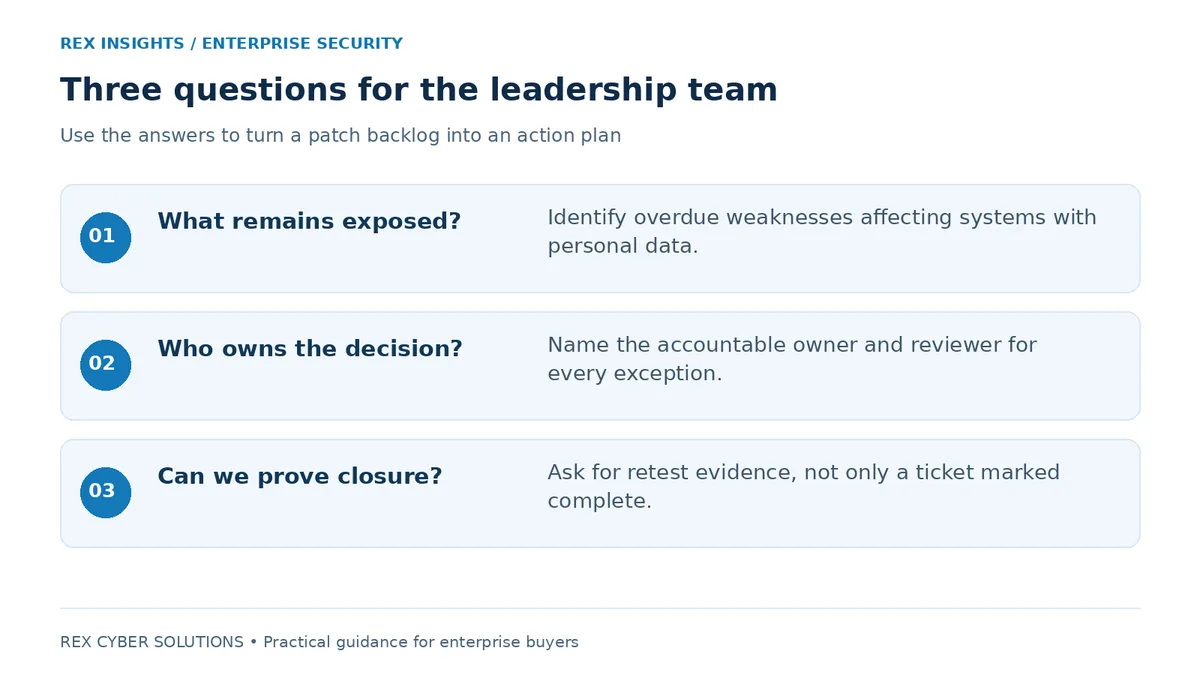
A leadership review should focus on remaining exposure, ownership and proof of action.
7. Frequently asked questions
Q1. Does every unpatched vulnerability lead to a ₹250 crore fine?
Answer: No. The maximum is not an automatic charge for each missed update. The applicable obligation, facts and statutory decision process matter. See the penalty explanation above.
Q2. Can a vulnerability scanner make us DPDP compliant?
Answer: No. It helps discover certain weaknesses. Your programme also needs validation, remediation ownership, verification and broader privacy controls. A scan result should feed an action process rather than become the final deliverable.
Q3. What if a patch is not yet available?
Answer: Evaluate temporary protection such as restricting access, disabling the affected feature, isolating the component or following a vendor mitigation. Verify whether the measure actually reduces exposure and keep a named owner for the permanent resolution.
Q4. Is an annual VAPT assessment enough?
Answer: A single assessment reflects a defined scope and point in time. New deployments, dependencies and configuration changes can introduce fresh exposure. Use a cadence that responds to change, with follow-up verification for significant findings.
Q5. Can we wait until the main DPDP commencement stage to begin?
Answer: Waiting compresses the time available to discover assets, clarify supplier ownership and test remediation. Use the transition period to build a functioning process and evidence trail. The legal timing does not stop a vulnerability from being exploited now.
Q6. What should we ask for in a gap assessment?
Answer: Ask for a review that connects privacy responsibilities with actual systems, ownership and evidence. Agree the scope, prioritised findings, practical next actions and how technical validation or retesting will be handled.
8. Start with a DPDP compliance gap assessment
If your privacy policies look complete but nobody can explain the unresolved vulnerability backlog, that is a useful place to begin. Bring security, compliance and the business owners into the same scoping conversation.
Ask Rex Cyber Solutions for a DPDP compliance gap assessment focused on the connection between personal data, security controls and operational evidence. Discuss your asset inventory, vulnerability reports, supplier arrangements and incident response process so the team can propose an appropriate scope.
The goal is a prioritised improvement plan: what needs attention, who should own it and what evidence will demonstrate completion. Where technical testing is needed, scope it explicitly alongside the compliance review.
Discuss a DPDP compliance gap assessment with Rex
Start with Rex’s DPDPA readiness check
Book a discovery call with the Rex team

%20(1).png)
.png)

.png)