Cloud computing has become an essential part of modern business, and Amazon Web Services (AWS) is one of the largest cloud platforms in the world. Many organizations rely on AWS to host their applications, websites, and databases.
However, a common question we often hear is:
“Is AWS secure, and is it accessible only to me?”
The short answer is yes; AWS is built with strong, industry-grade security. But the part you control still requires careful management and attention. “AWS secures the cloud, but your application must be secured by you.” Let’s break that down.
AWS Handles Infrastructure Security. You Handle Configuration Security:
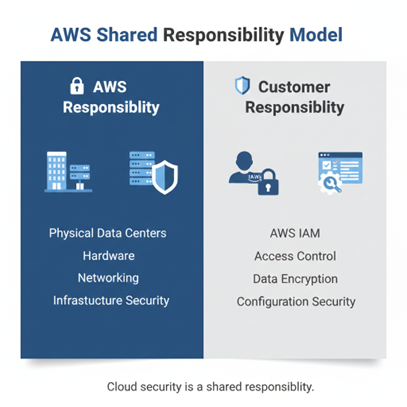
AWS invests heavily in AWS security at the infrastructure level, including physical data centre protection, network security, continuous monitoring, and independent compliance audits. However, AWS configuration security how your environment is set up is your responsibility. AWS follows a shared responsibility model: AWS secures the cloud, and you secure what you build inside it.
Managing Access and Protecting Your Data:
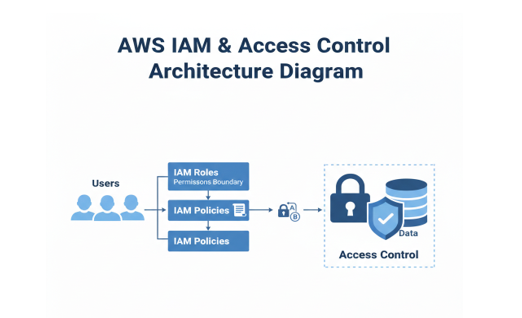
AWS provides powerful tools for AWS access control through AWS IAM (Identity and Access Management). AWS gives you the tools to store your data and run your product, but you are responsible for protecting what you put into AWS. You decide who can access what. This includes who gets usernames and passwords, who can read or write data, and who can change important settings. If you accidentally give “public access” to your database, anyone on the internet could see it. That’s not AWS’s fault it’s a configuration you set. AWS stores your data securely, but you must decide how it is protected. Will you encrypt it? Will you create backups? Will you keep older versions in case something gets deleted? If you skip backups and data is removed by mistake, AWS does not automatically restore it for you.
For strong identity and access management implementation, our Cloud Penetration Testing & Security services include analysis of IAM roles and permissions.
Securing Your Applications:
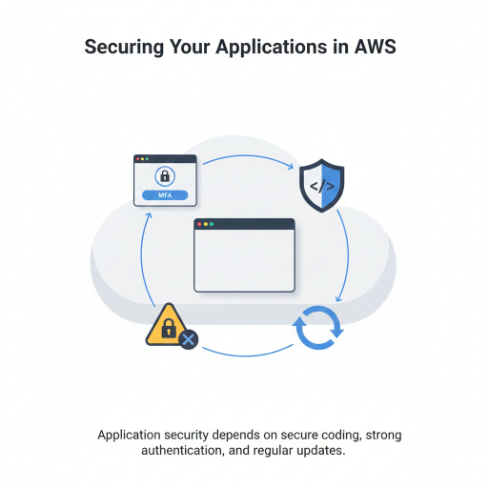
If you host an application on AWS, you are responsible for how secure that application is. You decide how users log in, how strong the login process is, and how your app handles the information people enter. You also control how your system responds to unexpected inputs or misuse. If your application has weak passwords, missing updates, or security gaps, attackers can still exploit it even if it is running on AWS. The cloud provides a secure foundation, but the safety of your product depends on how carefully it is built and managed. “The cloud provides a secure foundation, but the safety of your product depends on how carefully it is built and managed.”
Two Sides of Cloud Security:
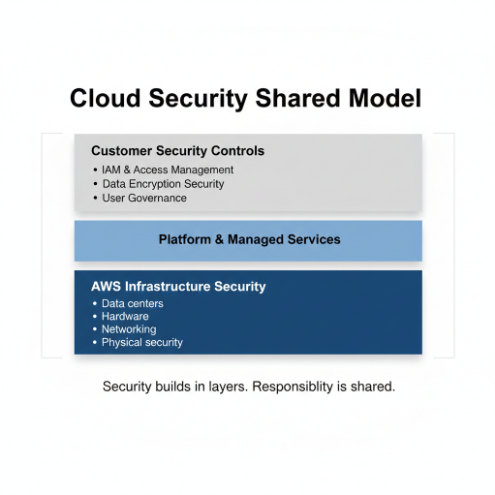
Cloud security is not handled by just one side. It works in partnership. On one side, AWS protects the cloud infrastructure the data centres, servers, and the technology that keeps everything running safely. On the other side, you are responsible for protecting what you build and store inside that cloud your data, your users, your application, and your access controls. Understanding these two sides is the key to keeping your product truly secure.
What Happens When Things Go Wrong?
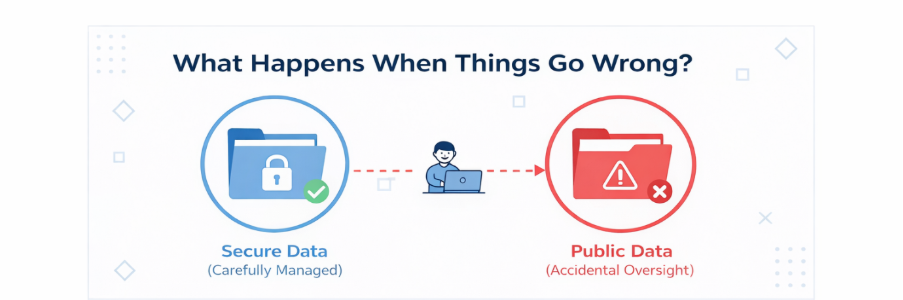
Imagine your company stores customer data in AWS. The platform itself is secure. But if a storage folder is accidentally made public, that data could be exposed to anyone online. This doesn’t happen because AWS is insecure. It happens because a setting inside your environment was not handled carefully. Even small oversights can create serious risks, which is why regular review and awareness are essential.
How Hackers Try to Get In:
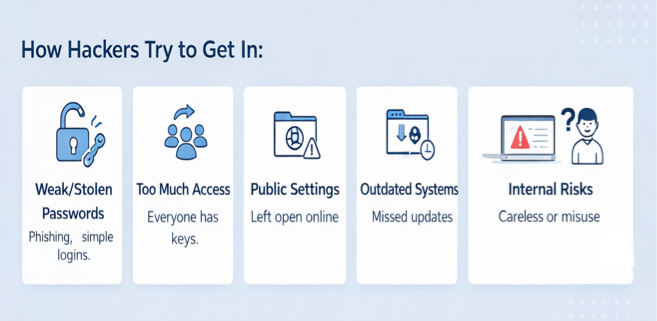
Cloud security incidents usually do not happen because the cloud platform itself fails. In most cases, they happen because small gaps inside a company’s own setup are overlooked. Here are some of the common ways attackers gain access:
Weak or Stolen Passwords: If passwords are simple, reused, or shared carelessly, attackers can guess or steal them. Phishing emails are often used to trick employees into revealing login details. Once they have access, they can move freely inside the system.
Too Much Access Given to Too Many People: Sometimes access is given to everyone instead of only those who truly need it. Former employees may still have login rights. When permissions are not controlled properly, it increases risk.
Public Settings by Mistake: A storage folder or service may accidentally be left open to the internet. These small configuration mistakes are one of the most common reasons data gets exposed.
Outdated Systems and Missed Updates: When software is not updated regularly, it can contain known weaknesses. Attackers actively look for these gaps and use them to enter systems.
Internal Risks: Not all threats come from outside. Sometimes risks come from inside the organization either through careless actions or intentional misuse.
How to Keep Your AWS Product Safe:
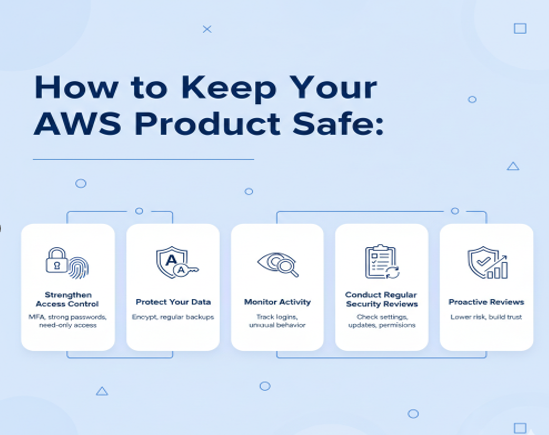
Strengthen Access Control:
Use multi-factor authentication (MFA) so logins require more than just a password. Create strong, unique passwords and give access only to people who truly need it.
Protect Your Data:
Encrypt sensitive information so it cannot be easily read, even if someone gains access. Regular backups also ensure important data is not permanently lost.
Monitor Activity:
Keep track of login attempts and unusual behaviour. Early alerts can help you act before a small issue becomes a serious problem.
Conduct Regular Security Reviews:
Schedule routine checks to review permissions, settings, and system updates. Regular reviews reduce the risk of mistakes, outdated software, or unnoticed gaps. Proactive reviews strengthen your security posture and build long-term trust with customers and partners.
5 Best Practices to Strengthen AWS Security
1.Strengthen AWS Access Control using MFA and least-privilege IAM roles.
2. Improve AWS Data Protection with encryption and secure backups.
3. Monitor and log account activity regularly.
4. Conduct routine configuration reviews.
5. Keep systems updated with security patches
Along with these best practices, engaging our Secure Code Review Services can help eliminate hidden logic flaws and strengthen your AWS
What This Means for Your Business:
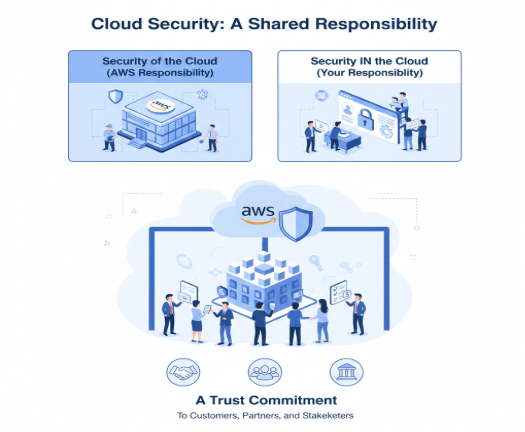
Yes, AWS security at the infrastructure level is strong and reliable. However, true AWS cloud security depends on how well you manage access, configuration, and data protection. Cloud security is a shared responsibility. AWS provides the secure foundation, but your policies and controls determine the strength of your protection. In today’s business environment, strong AWS security is not just a technical requirement it is a trust commitment to customers and stakeholders.
Frequently Asked Questions (FAQ)
1. Is cloud data truly secure?
Cloud data can be highly secure when properly configured. Cloud providers like AWS offer strong infrastructure protection, including encrypted data centres and network security. However, real data security depends on how access permissions, encryption, and identity controls are managed. Most security incidents occur due to configuration gaps, not platform weakness.
2. Who is responsible for cloud security?
Cloud security works under a shared responsibility model. The provider secures the infrastructure, while customers are responsible for protecting their applications, data, and access controls. In AWS environments, properly managing IAM roles, encryption, and configurations is critical to maintaining a secure cloud posture.
3. Can cloud data be exposed without being hacked?
Yes. Data exposure often happens due to misconfigurations, excessive permissions, or public storage settings rather than direct hacking. In AWS, enabling multi-factor authentication (MFA), applying least-privilege IAM policies, and regularly reviewing configurations significantly reduces accidental exposure risks.
4. What are the most effective ways to strengthen cloud data security?
Strong cloud data security requires continuous validation. In AWS environments, enabling encryption at rest and in transit, restricting access through IAM, monitoring activity, and conducting periodic security assessments help maintain long-term protection. Security is not a one-time setup it requires ongoing oversight.

%20(1).png)
.png)

.png)